Terraform Diagram Generator
TerraVision turns Terraform code into a cloud architecture diagram. It reads the output of terraform plan, works out which resources connect to or sit inside which, and draws them with the official AWS, Azure and Google Cloud icons. Because the diagram comes from the plan, it shows what the code deploys, not an approximation of it.
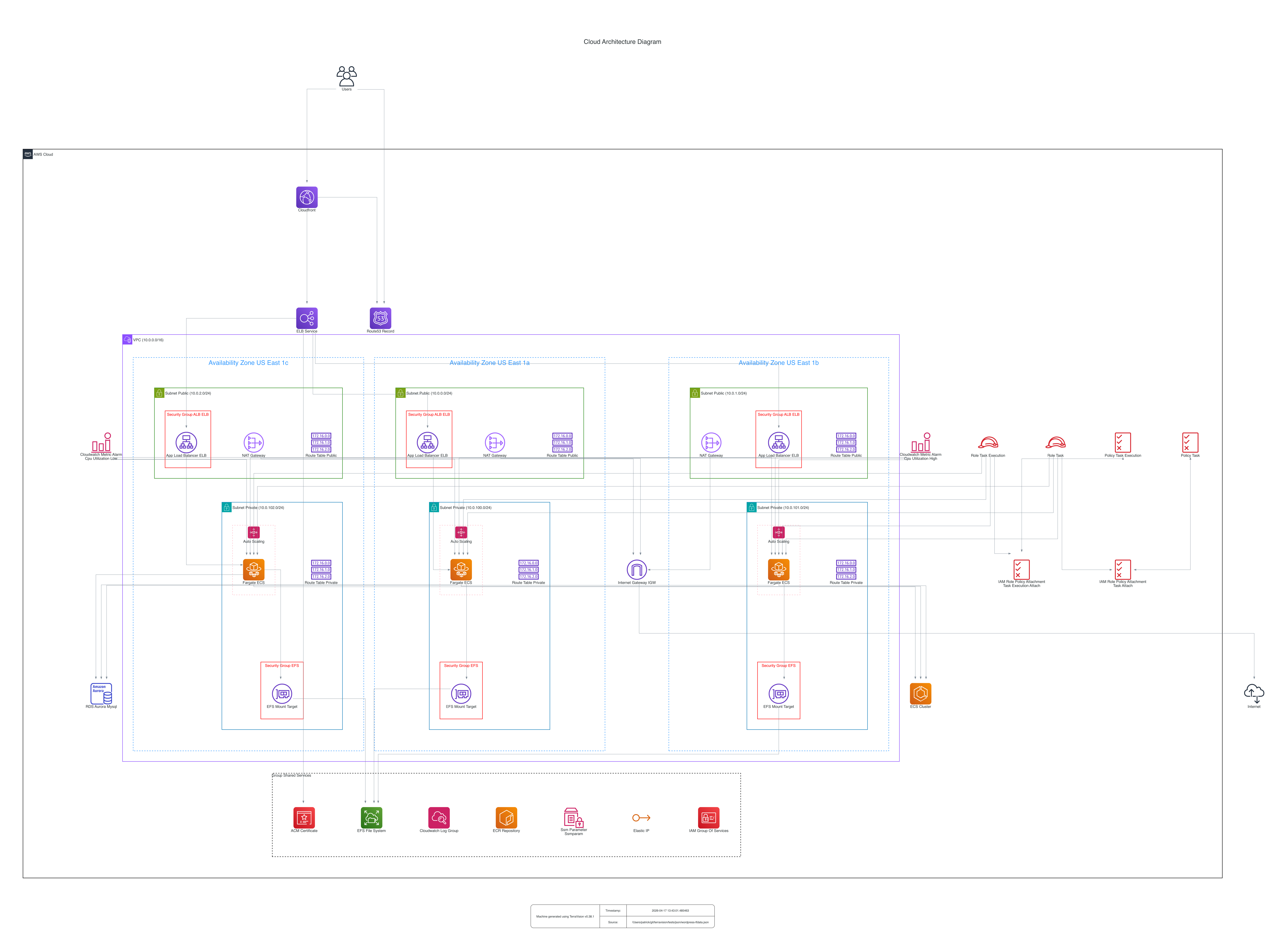
How do I generate an architecture diagram from Terraform?
pipx install terravision

# from a local folder
terravision draw --source ./infrastructure

# from a Git repository (note the // before a subfolder)
terravision draw --source https://github.com/patrickchugh/testcase-bastion//examples

# as an editable draw.io file
terravision draw --source ./infrastructure --format drawio
You need Graphviz, Git and Terraform installed. Full steps: Installation.
How is this different from terraform graph?
terraform graph prints a raw dependency graph that is accurate but hard to read. TerraVision takes that graph, adds the plan data, groups resources into VPCs, subnets and resource groups, applies the official cloud icons, and produces a diagram you can put in front of a stakeholder.
Does it work with modules, Terragrunt and OpenTofu?
Yes. Modules are resolved through terraform plan, including modules from Git. Single-module and multi-module Terragrunt projects are detected automatically. OpenTofu works as a drop-in replacement for the Terraform binary.
Does it need cloud credentials?
TerraVision itself never calls a cloud API. Terraform needs credentials to run terraform plan. To keep the diagram step credential-free, run the plan once in a trusted environment and pass the result in with --planfile and --graphfile. See Pre-Generated Plan Input.
Can I paste Terraform into an AI tool instead?
You can, but there are two problems. An AI model reading pasted Terraform chooses what to draw and can miss or invent resources. And pasting infrastructure code, or worse a state file, into a hosted tool sends it to a third party: Terraform state can hold secrets such as database passwords and access keys in plain text, which is against security policy in most organisations. TerraVision reads the plan on your own machine and uploads nothing. TerraVision parses the plan itself. If you use it through an AI assistant, the assistant calls TerraVision on your Terraform folder and the diagram still comes from the plan. See Use with AI assistants.
How do I keep the diagram in sync with the code?
Use the TerraVision GitHub Action to redraw the diagram on every change. A terravision.yml file next to the Terraform keeps your title, labels and numbered flows across every regeneration.
Will the diagram show drift?
No. The diagram shows the desired state declared in your code. Resources created by hand in the console, or changed outside Terraform, do not appear. Tools that scan a live cloud account show deployed state instead; see how they compare.
Can I go the other way, from a diagram to Terraform?
Yes. Design the architecture with an AI assistant and have it write the Terraform, then use this page's workflow to verify the result. See diagram to Terraform.
Related
- AI cloud architecture diagram generator
- Cloud architecture diagram generator
- AWS, Azure and Google Cloud diagram generators